Strawberry Remote Controller
-
@poldi54 After reading your latest post, it does seem that they are quite similar. You did not have any playlist support when I was working on mine. Mine is Android only. I might change it to support Apple, but am not sure yet. This might be a case of, there were no apps, now multiple for remote control
 . Do you have any screen shots that I can look at? Mine are on the git page I provided. I would be interested in seeing your work, and if anything, maybe we can work together. Is yours Kotlin based? I read somewhere someone here was making one with Qt.
 -
@FuzzyBottom I have (arguably) the oldest PR for this. I created a debian release here and and you can get the android client by signing up as a tester either via
App store https://play.google.com/store/apps/details?id=com.zudiewiener.strawberryremote
or
Web
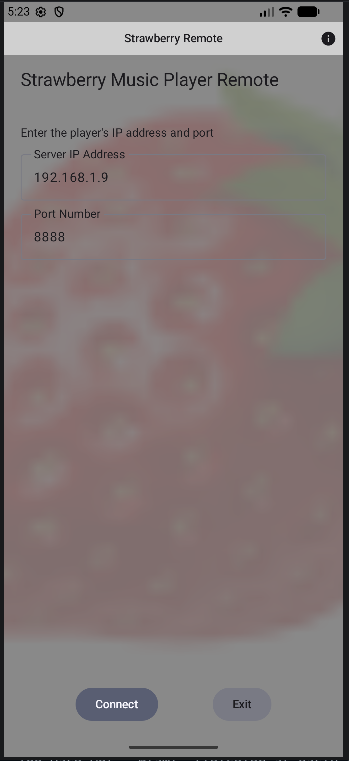
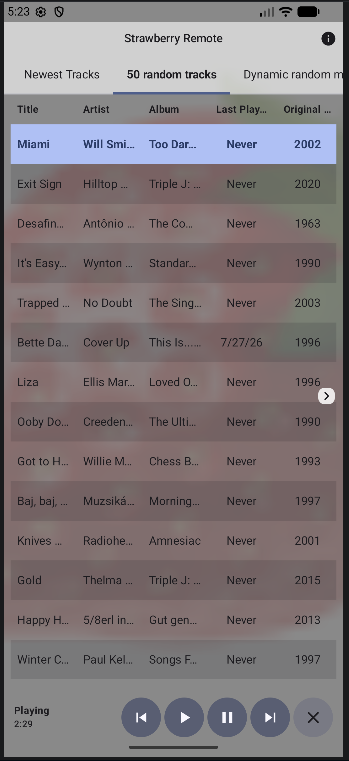
https://play.google.com/apps/testing/com.zudiewiener.strawberryremoteScreenshots are from the emulator on Ubuntu. I also have a Qt linux client to help in testing.
-
Thank you for the screen shots. From what I am seeing, they are similar. One of the things with mine, is it is more of an API (of sorts). It takes JSON input and works with that. It sends changes as JSON as well. Anyone can create an app or web page etc, and use it to communicate with the server. It is built on Kotlin, so it is native to Android. It is password protected if desired. Not that it is important on a local network, but I was looking at screenshots from the old Clementine app online, and saw they had a password. I think that would be handy in situations where you have roommates or family that you do not want them to access your player and start messing with your songs as you are listening
-
@FuzzyBottom Fair point re. password protection. I could add this as an config option in strawberry.
mind you, right now it looks like there is harldy anybody interested in this feature anyway -
@poldi54 I agree with you on the interest. I started this as a project to kill time. I will keep working on it, and if anyone is interested, they will have a choice between both of ours. Looking forward to seeing more of your screen shots etc. I will be posing more on my github page soon. Working on various screens, rotation etc currently. If you ever want to make one that deals with JSON files, let me know and we can work together on the server side using those commands so they work for both of our controllers.
-
I added more screen shots on the github page. It shows different screen orientations with light/dark mode etc. It works for phones currently, and I will be making tablet layouts, and maybe foldable devices as well. I might look into adding smart playlists, and if I can, some radio options. Not sure how that works yet, but will look into it.
https://github.com/jacktolmie/strawberry_app -
I have now added a token that protects unwanted changes to a playlist via a client.
-
@poldi54 I think I will stop working on this for now. I was working on the radio sources. I have the backend mostly finished for Soma FM, Radio Paradise, and Radio Browser. I think working on Soma would be a bad idea since we are not allowed to use their streams any longer. The lack of interest in the remote controller(s) in general does leave little to motivate me. Best of luck with your project.
-
@FuzzyBottom NP. I', also somewhat puzzled at the lack of interest for the remote, but there you go.
-
The Android client for the Strawberrt network remote has been accepted into the Google Play store under "Strawberry Music Player Remote"
The following is from the Android app help screen.
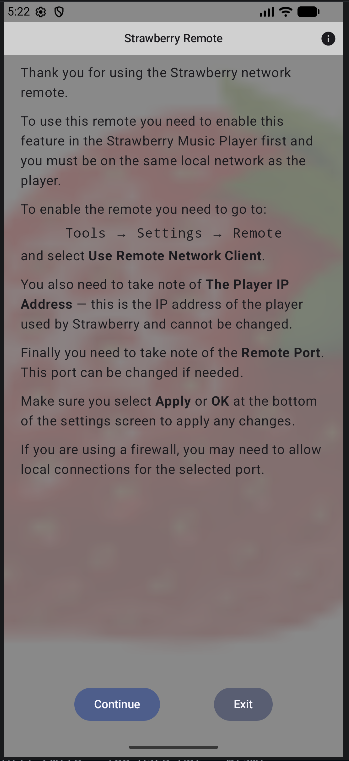
Setting up the remote:
-
list itemIn Strawberry, go to Tools → Settings → Remote and enable "Use Remote Network Client".
-
list itemNote the Player IP Address shown there - enter this in the client to connect (it cannot be changed).
-
list itemNote the Remote Port - this can be changed if needed.
-
list itemClick Apply or OK at the bottom of the settings screen for changes to take effect.
If you're using a firewall, you may need to allow local connections for the selected port.
Playlist token (optional):
-
list itemPlaylist changes - adding, removing, or creating a playlist - can be protected with a token, so only clients that know it can modify your playlists. This guards against unwanted changes from other devices on your network.
-
list itemEnabled in Strawberry's Remote settings by setting a Remote Token - leave that field empty to disable the protection entirely.
-
list itemIf a token is set, the client asks for it when you connect. Enter it to enable playlist changes, or choose Bypass to continue read-only (you can still view and play, but not add, remove, or create playlists).
-
list itemAn incorrect token can be retried - after too many incorrect attempts, the server disconnects the client as a safeguard.
-
list itemTurning the token requirement on or off on the player takes effect immediately for clients already connected, prompting for the token if it becomes required.
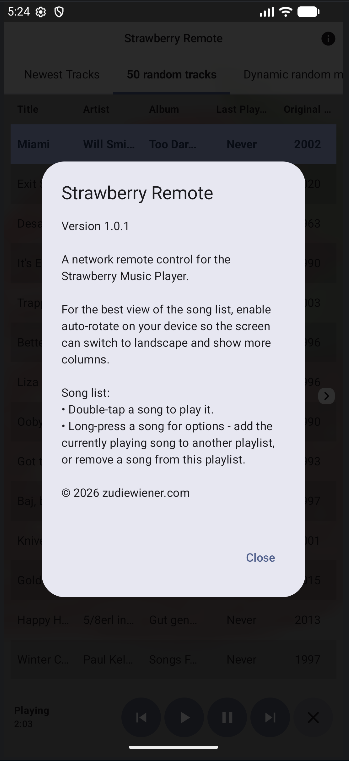
For the best view of the song list, enable auto-rotate on your device so the screen can switch to landscape and show more columns.
Song list:
-
list itemDouble-tap a song to play it.
-
list itemLong-press a song for options - add the currently playing song to another playlist, or remove a song from this playlist.
As Jonas is too busy to review my code I've been keeping my fork in sync with the Strawberry releases. If you'd like to try the remote you can install the latest deb release from my github fork
Any issues let me know.
-