Another Remote Control
-
Hi poldi54,
thanks a lot for making this available!! I've tried the Android Remote and it works well here. Would love an option to change volume via the phone in a future version if possible.
Thanks again, and do let me know if I can help with testing.Cheers,
David -
@spoo333 Thanks for testing.
I'm using optical out and a dac, so volume is always at 100%.
I'm happy to add anything other find useful, though.
Cheers,
Leo -
@poldi54 thanks for your reply, Leo.
If you could add volume control for us non DAC users, Repeat and Shuffle, that would be awesome.
Another feature I'd absolutely love but that might be challenging/beyond the remote control protocol scope is the ability to change genres of tracks.
For example: I'm listening to new tracks that I haven't listened to before to catalogue them. Track 1 might have "Deep House" as the genre category, but it should be in "Psychedelic Rock". If the remote could retrieve all the musical genres in the Strawberry library and then allow some kind of a drop-down menu to select the right music genre for the playing track, I'd have all my Strawberry/Remote needs fulfilled
Well, that and Strawberry allowing for alphabetical sorting of smart playlistsThanks,
David -
@spoo333 David,
Volume control should be pretty easy to implement.
Shuffle would need a bit of investigation (i.e. should it be just shuffle on/off or the full Shiffle options available in the player, should it be playlist specific or generic, etc.)
Not sure about Repeat. Fo you mean the entire playlist?
Leo
-
@poldi54 Similar to the options that are available in Strawberry for Shuffle and Repeat if that's not too complicated?
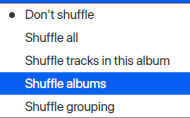
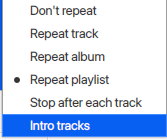
Happy to hear about volume control. Thanks
PS: I've got no idea how complicated implementing features in a remote is
-
@spoo333 Thanks for the feedback. As far as how easy difficult these changes are for the remote. If the functionlity already exists in the player pretty straight forward. for anything else it would depend on the change.
-
I'll do the volume change first. I'm thinking of providing the volume change option in the network remote settings page is it only makes sense for non optical output.
If volume control is enabled, the client will have a slider for volume control -
This post is deleted! -
@spoo333 Thanks for the feedback. As far as how easy difficult these changes are for the remote. If the functionlity already exists in the player pretty straight forward. for anything else it would depend on the change.
thanks for the explanation. Would it be difficult to implement a download function to copy tracks from Strawberry to an android device?
-
I'll do the volume change first. I'm thinking of providing the volume change option in the network remote settings page is it only makes sense for non optical output.
If volume control is enabled, the client will have a slider for volume controlSounds great. Looking forward to testing future versions of your remote
Hello! It looks like you're interested in this conversation, but you don't have an account yet.
Getting fed up of having to scroll through the same posts each visit? When you register for an account, you'll always come back to exactly where you were before, and choose to be notified of new replies (either via email, or push notification). You'll also be able to save bookmarks and upvote posts to show your appreciation to other community members.
With your input, this post could be even better 💗
Register Login