If I may make a suggestion, why not make things easier on yourself and put covers (ie. folder.jpg) inside each music folder? In my experience of using many different audio players, I've found that to be a far better solution than relying on embedded artwork. It also has the additional benefit of displaying folder thumbnails in file managers, if you use something like Dolphin or Thunar. If interested, you can batch process your entire music library in one step with Musicbrainz Picard, by selecting the option "save cover images as separate files" and then saving.

Posts made by Lucidae
-
RE: Strawberry ignores embedded album cover and displays wrong one instead.posted in Technical Help
-
RE: About the new sort tags behaviorposted in General Discussion
@NescoPesto
Yes, I assume that Strawberry now looks for the "ARTISTSORT" metadata tag (last name, first name) and uses that value if present as the default sorting option in your collection. -
About the new sort tags behaviorposted in General Discussion
I noticed that after the latest update my collection's sort order has completely changed, and it looks to be due to this;
From the changelog for Version 1.2.12...
Added support for sort tags to collection, playlists and smart playlists.
My question - is there an option anywhere to disable that new sort behavior? Because I could not see one. Although it might be useful to some users, in my situation it's less than ideal. It's true I could fix it myself by re-tagging my collection, but I hope that won't be necessary.
-
RE: How to install latest version of Strawberry on Ubuntu 24.10posted in Technical Help
@idontknow said in How to install latest version of Strawberry on Ubuntu 24.10:
Where did you get your package? From the Strawberry PPA? From the site?
https://github.com/strawberrymusicplayer/strawberry/releases/download/1.1.3/strawberry_1.1.3-oracular_amd64.debIf that's what you are talking about, then it is a bug as it should install cleanly. If not, that's probably what you should be using.
Whoops, you're right. I hadn't noticed there was already a binary for 24.10 on the github release page. Next time I'll look there instead of relying on the website's links. Thanks for pointing that out.
-
How to install latest version of Strawberry on Ubuntu 24.10posted in Technical Help
At the present moment, those wanting to upgrade to the latest version of Strawberry (1.1.3) with their package manager will find it is not compatible with the newly-released Ubuntu 24.10 "Oracular Oriole" due to some qt6 dependency issues. However I discovered a simple work-around. The current Debian version only requires a single dependency to make it work, though it will have to be downloaded and installed manually.
Step 1)
Grab the package libicu72 and install it locally with apt;
https://packages.ubuntu.com/mantic/libicu72
Architecture: amd64Step 2)
Grab the Debian deb binary and install it locally with apt;
https://www.strawberrymusicplayer.org/#download
Debian 12 "Bookworm" (x86_64) -
RE: artist info by Wikipediaposted in Feature Suggestions
@jonas said in artist info by Wikipedia:
One problem is that the Wikipedia API returns everything related to a specific search, not just artists. So I consider the Wikipedia API not the be good enough for our use-case.
What about using MusicBrainz's API instead? Their artist data seems to be derived from Wikipedia as well.
-
Show album info in the context tabposted in Feature Suggestions
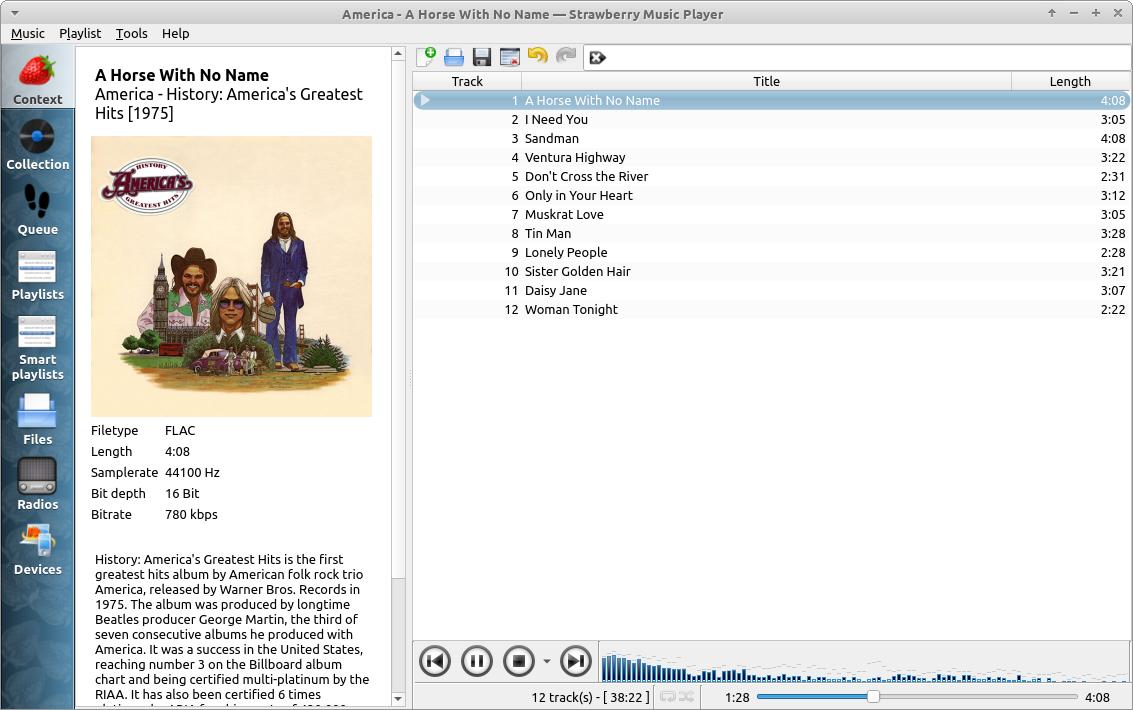
It would be nice to be able to show a now playing album description in the "context" tab, along with existing options of song lyrics and technical data. In an ideal situation such information could be scraped from MusicBrainz, but I would be content for this function to simply read a locally stored text string, either in the form of a metadata tag or document file placed in the same folder. See the attached screenshot for a demonstration.