Dark Mode Ubuntu
-
Hi,
I use Strawberry on ubuntu 23 and the new update V1.0.22 switch automatically to bright mode instead of the Dark mode config of Ubuntu.
Is there a way to get Strawberry back on dark mode, which is more comfortable.Cheers,
BEn -
Strawberry uses QT for it's GUI library, presumably you're on GNOME, which only configures GTK applications natively. There's quite a few ways to configure QT applications. The lightweight way would be to use qt5ct. With it you'll also want to add
QT_QPA_PLATFORMTHEME=qt5ctwherever you set your environment variables. -
Same long time issue here,
Linux Mint 21.3 (Virginia), Ubuntu 22.04 jammy.Don't understand how to set up Qt5 or Qt6.
-
@overdress188 ,
1st) install qt6ct app using your linux version package manager.2nd) are you using bash shell? if you are, in your home folder there is .bash_profile and .bashrc files in your home directory.
open .bash_profile (or .bashrc if you want the environment variable set there) and add the following line:
export QT_QPA_PLATFORMTHEME=qt6ct3rd) open the qt6ct program you installed from your package manager, its a gui prgram not commandline.
On the Appearance tab (first tab) you will see a setting for color scheme: set it to 'darker' and click apply.
Logout, log back in and now the qt6ct setting you just changed will enable 'darker' mode in Strawberry.
-
Hi there.
Running Strawberry 1.0.23 on Ubuntu 24.04.1.
I have installed qt6ct, set the QT_QPA_PLATFORMTHEME variable to qt6ct in my user .profile, also set qt6ct fusion theme to "darker" in qt6ct, and choose the fusion theme in Strawberry.
But Strawberry theme remain clear.
What did I missed ? -
@flameche Follow the instructions from @overdress188 but change everything to qt5ct instead. That worked for me
-
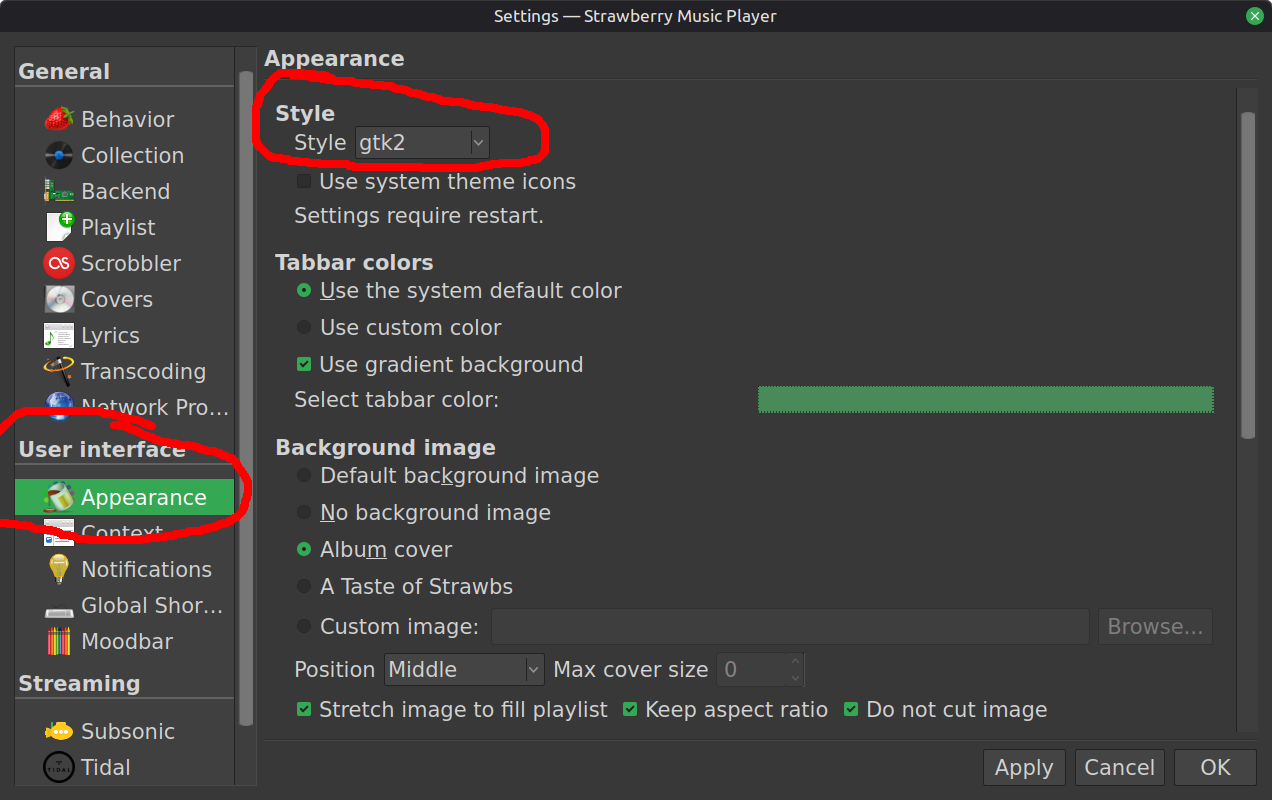
I'm on Linux Mint Cinnamon 22.2 Zara. The following config just worked for me:
Tools > Settings... > User interface > Appearance > Style > Style: gtk2
Hello! It looks like you're interested in this conversation, but you don't have an account yet.
Getting fed up of having to scroll through the same posts each visit? When you register for an account, you'll always come back to exactly where you were before, and choose to be notified of new replies (either via email, or push notification). You'll also be able to save bookmarks and upvote posts to show your appreciation to other community members.
With your input, this post could be even better 💗
Register Login