Keyboard Shortcuts Greyed Out
-
Apologies if I am missing something, but I am using Fedora 40 under GNOME, and the choices to change keyboard shortcuts are greyed out, even after unticking "Use Gnome (GSD) shortcuts when available) and restarting.
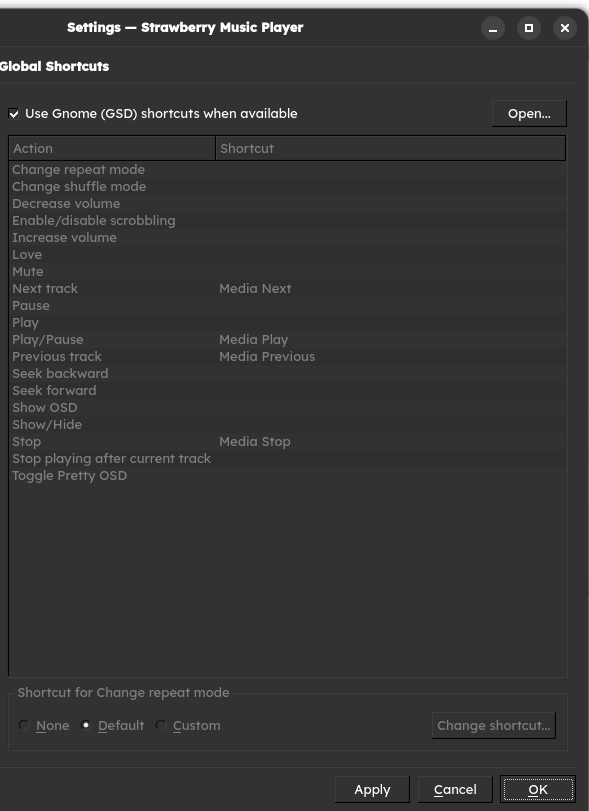
I am trying to use the "Change repeat mode" assignment, but that is not found under the multimedia section of GNOME's built-in keyboard shortcut settings. Any help would be appreciated, thanks!
-
@WeeGerGai
I suggest to install KGlobalAccel, that's the globalshortcuts backend to use all shortcuts through MPRIS2. -
@jonas
After installation is there anything that must be done? The options are still all greyed out and as far as I can tell there isn't anything in the settings for applying KGA. -
@WeeGerGai
I think it should start automatically on logon, check that it is running with:systemctl --user status plasma-kglobalaccel.service -
@jonas
Sorry for the late reply,The output is:
     Loaded: loaded (/usr/lib/systemd/user/plasma-kglobalaccel.service; static)
    Drop-In: /usr/lib/systemd/user/service.d
             └─10-timeout-abort.conf
     Active: inactive (dead)
Not sure what the dead inactive status means in this case.

Hello! It looks like you're interested in this conversation, but you don't have an account yet.
Getting fed up of having to scroll through the same posts each visit? When you register for an account, you'll always come back to exactly where you were before, and choose to be notified of new replies (either via email, or push notification). You'll also be able to save bookmarks and upvote posts to show your appreciation to other community members.
With your input, this post could be even better 💗
Register Login