• Categories
    • Recent
    • Tags
    • Popular
    • Users
    • Groups
    • Register
    • Login

    upgrade 08.3?

    Scheduled Pinned Locked Moved Technical Help
    14 Posts 3 Posters 3.3k Views 1 Watching
    Loading More Posts
    • Oldest to Newest
    • Newest to Oldest
    • Most Votes
    Reply
    • Reply as topic
    Log in to reply
    This topic has been deleted. Only users with topic management privileges can see it.
    • C
      catch22 @jonas
      last edited by

      @jonas said in upgrade 08.3?:

      @catch22
      You need to install it too using apt or Synaptic.

      apt install strawberry
      

      Working now, thanks! 🙂

      C 1 Reply Last reply
      Reply Quote 0
      • C
        catch22 @catch22
        last edited by

        @catch22 said in upgrade 08.3?:

        @jonas said in upgrade 08.3?:

        @catch22
        You need to install it too using apt or Synaptic.

        apt install strawberry
        

        Working now, thanks! 🙂

        But not good.. although it does show as version 09.2, immediately when clicking a song to play, Strawberry freezes up completely again, just as it did in the old version.
        This is completely unworkable because it not only freezes the player, but the whole pc - I have to cold start the whole desktop every time.

        jonasJ 1 Reply Last reply
        Reply Quote 0
        • jonasJ
          jonas @catch22
          last edited by

          @catch22
          Most of the time that has something to do with the sound setup on your computer.
          It probably freezes when it tries to open the soundcard.
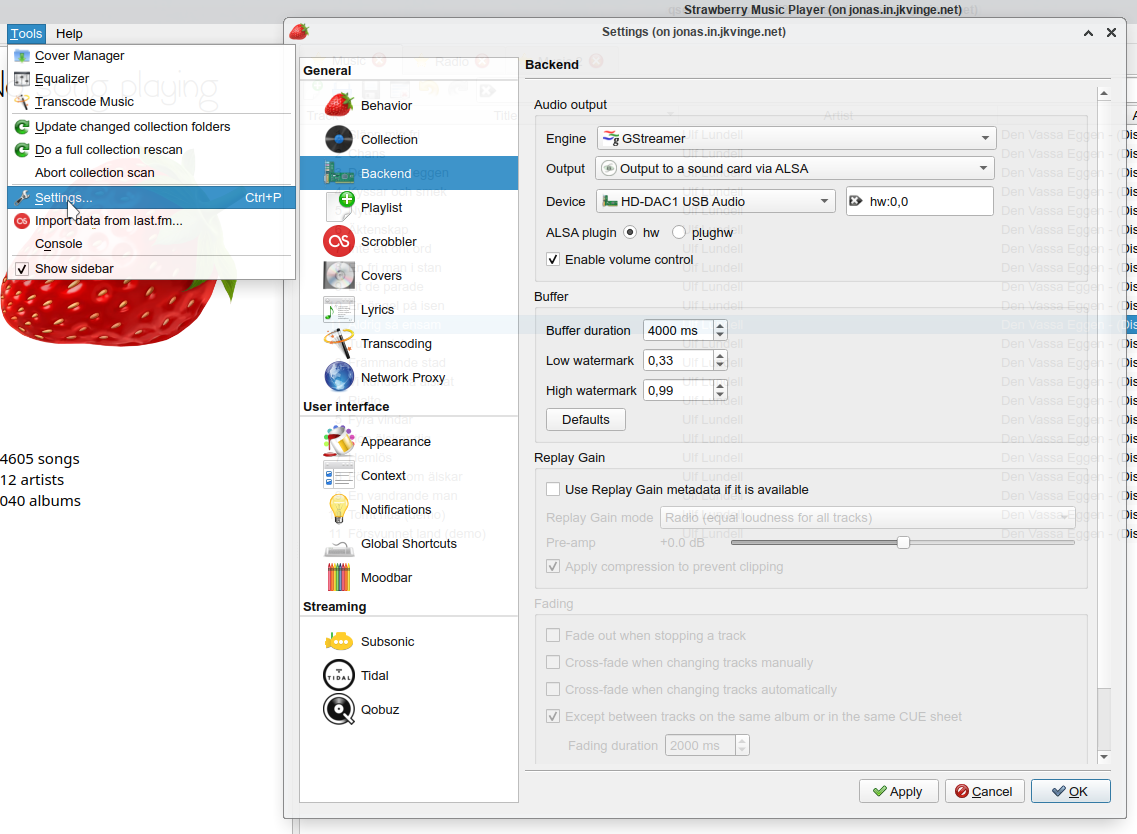
          Try different settings in Settings / Backend, try selecting a different device.

          C jonasJ 2 Replies Last reply
          Reply Quote 0
          • C
            catch22 @jonas
            last edited by

            @jonas I'm on Mint 19.3 - there's nothing called Backend.

            1 Reply Last reply
            Reply Quote 0
            • jonasJ
              jonas @jonas
              last edited by

              By the way, did you try using SysRq before you cold boot your computer?
              On Linux you can usually solve most system freeze without rebooting using SysRq.
              https://en.wikipedia.org/wiki/Magic_SysRq_key
              ALT + SysRq + f has saved me a lot. It kills the most memory consuming process.

              C 1 Reply Last reply
              Reply Quote 0
              • C
                catch22 @jonas
                last edited by

                @jonas that looks like very good stuff to know - will investigate it, thanks.

                Still, no "Backend" in my settings.

                BTW I've never had sound problems with any other player on this machine; mocp, vlc, rhythmbox, audacity..

                jonasJ 1 Reply Last reply
                Reply Quote 0
                • jonasJ
                  jonas @catch22
                  last edited by

                  @catch22 ksnip_20210412-224129.png

                  C 1 Reply Last reply
                  Reply Quote 1
                  • C
                    catch22 @jonas
                    last edited by

                    @jonas I was looking in the wrong place - settings in Linux Mint 🙂

                    Now I see it is of course within Strawberry; I have 10 options and have no clue which one to pick.
                    The default was as you see in my attached screenshot.
                    Another difference with yours is: ALSA plugin hw nore plughw is ticked.
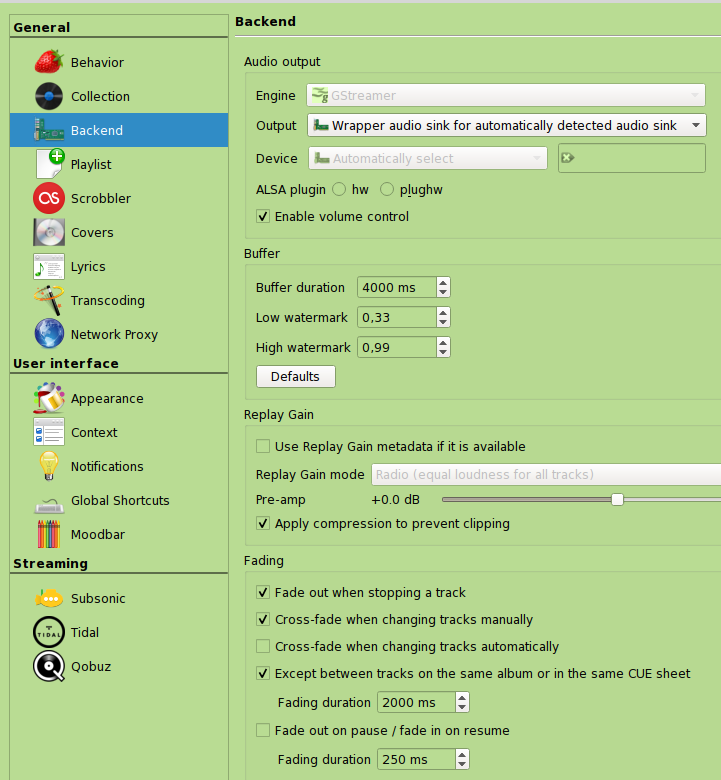
                    strawberry_backend.png

                    jonasJ 1 Reply Last reply
                    Reply Quote 0
                    • jonasJ
                      jonas @catch22
                      last edited by

                      Check that you have ALSA and PulseAudio as options under Output.
                      Check that your soundcard is listed under device.
                      Try specifically selecting ALSA or PulseAudio and the device.

                      C 1 Reply Last reply
                      Reply Quote 1
                      • C
                        catch22 @jonas
                        last edited by

                        @jonas said in upgrade 08.3?:

                        Check that you have ALSA and PulseAudio as options under Output.
                        Check that your soundcard is listed under device.
                        Try specifically selecting ALSA or PulseAudio and the device.

                        Working perfectly now, thank you enormously 🙂

                        1 Reply Last reply
                        Reply Quote 1

                        Hello! It looks like you're interested in this conversation, but you don't have an account yet.

                        Getting fed up of having to scroll through the same posts each visit? When you register for an account, you'll always come back to exactly where you were before, and choose to be notified of new replies (either via email, or push notification). You'll also be able to save bookmarks and upvote posts to show your appreciation to other community members.

                        With your input, this post could be even better 💗

                        Register Login
                        • First post
                          Last post
                        Powered by NodeBB | Contributors