Debugging Strawberry
-
Hello.
I've been having problems lately with Strawberry just dying once or twice over a day on my Windows machine. Downloaded 1.0.1 debug version and I'm getting this:
11:05:08.773 INFO  main:171                         Strawberry 1.0.1
11:05:08.812 INFO  main:172                         "Windows 10 Version 2009 10 - (winnt 10.0.19043) [x86_64]"


Thread 1 received signal SIGSEGV, Segmentation fault.
0x00007ffacff623ed in QTimeLinePrivate::setCurrentTime(int) () from c:\Program Files\Strawberry Music Player Debug\Qt6Core.dll
(gdb) bt
#0  0x00007ffacff623ed in QTimeLinePrivate::setCurrentTime(int) ()
   from c:\Program Files\Strawberry Music Player Debug\Qt6Core.dll
#1  0x00007ffacfded687 in QObject::event(QEvent*) () from c:\Program Files\Strawberry Music Player Debug\Qt6Core.dll
#2  0x00007ffac31f5986 in QApplicationPrivate::notify_helper(QObject*, QEvent*) ()
   from c:\Program Files\Strawberry Music Player Debug\Qt6Widgets.dll
#3  0x00007ffacfdb7638 in QCoreApplication::sendEvent(QObject*, QEvent*) ()
   from c:\Program Files\Strawberry Music Player Debug\Qt6Core.dll
#4  0x00007ffacff3133f in QEventDispatcherWin32Private::sendTimerEvent(int) ()
   from c:\Program Files\Strawberry Music Player Debug\Qt6Core.dll
#5  0x00007ffacff31cd0 in qt_internal_proc(HWND__*, unsigned int, unsigned long long, long long) ()
   from c:\Program Files\Strawberry Music Player Debug\Qt6Core.dll
#6  0x00007ffb3385e7e8 in USER32!CallWindowProcW () from C:\WINDOWS\System32\user32.dll
#7  0x00007ffb3385e229 in USER32!DispatchMessageW () from C:\WINDOWS\System32\user32.dll
#8  0x00007ffacff345f2 in QEventDispatcherWin32::processEvents(QFlags<QEventLoop::ProcessEventsFlag>) ()
   from c:\Program Files\Strawberry Music Player Debug\Qt6Core.dll
#9  0x00007ffac3bfefc5 in QWindowsGuiEventDispatcher::processEvents(QFlags<QEventLoop::ProcessEventsFlag>) ()
   from c:\Program Files\Strawberry Music Player Debug\Qt6Gui.dll
#10 0x00007ffacfdc16e3 in QEventLoop::exec(QFlags<QEventLoop::ProcessEventsFlag>) ()
   from c:\Program Files\Strawberry Music Player Debug\Qt6Core.dll
#11 0x00007ffacfdbffc6 in QCoreApplication::exec() () from c:\Program Files\Strawberry Music Player Debug\Qt6Core.dll
#12 0x00007ff6a39f2690 in main (argc=1, argv=0x16fdb3f0390)
    at /persistent-data/mingw/windows-debug-x64/source/src/main.cpp:316
(gdb)
It isn't necessarily the original problem though, because I can easily trigger it in the debug version by pressing Next Track. Pressing Next Track in the release version does not crash the program. I also tried debug version
14:43:04.344 INFO  main:171                         Strawberry 1.0.1-41-gd2075001 Qt "6.2.3"
14:43:04.383 INFO  main:172                         "Windows 10 Version 2009 10 - (winnt 10.0.19043) [x86_64]"
and both debug version behave the same way.
-
@rnd
I can't reproduce any crashes under Windows even with the debug version under gdb when pressing next.
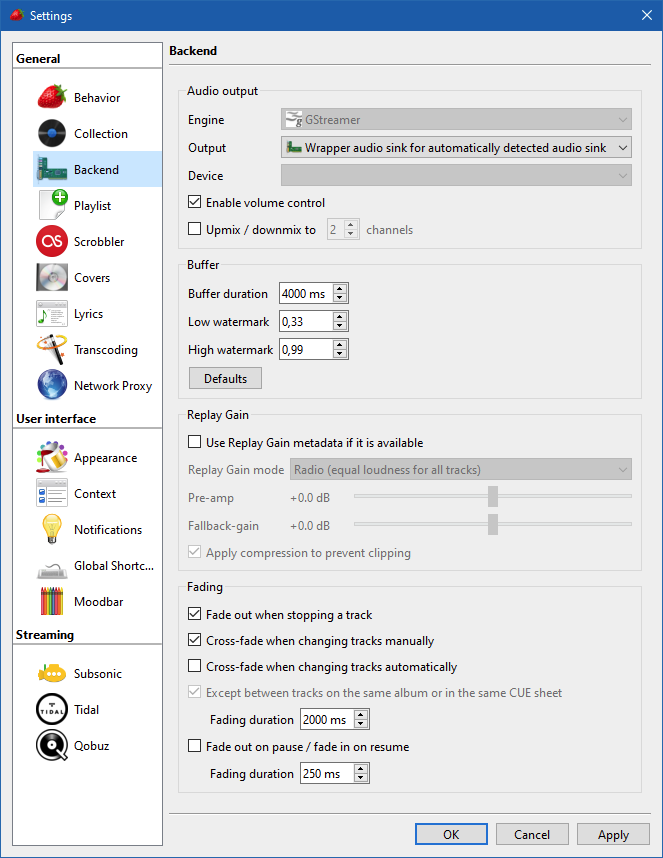
Can you take a screenshot of the backend settings?
What audio format are you playing, and is it local files or streams? Do you have associated album cover? -
MP3s from a samba-share mounted as a network drive over a wifi connection. Yes, there are album covers.
-
@rnd
Does it still crash if you disable all the fading options? -
I think I found the problem.
Possible fix: https://github.com/strawberrymusicplayer/strawberry/commit/7caeb4763737af1689ab1596c80181ece7cb5b4a -
@jonas Disabled all fading and yes, Next Track no longer causes segmentation fault.
-
@rnd
Version 1.0.2 is released which should hopefully fix the bug.

Hello! It looks like you're interested in this conversation, but you don't have an account yet.
Getting fed up of having to scroll through the same posts each visit? When you register for an account, you'll always come back to exactly where you were before, and choose to be notified of new replies (either via email, or push notification). You'll also be able to save bookmarks and upvote posts to show your appreciation to other community members.
With your input, this post could be even better 💗
Register Login