Not all Songs Copied to Device, No Error Displayed
-
Strawberry 1.0.4 on Fedora 35
256GB FAT32 Samsung USB Flash Drive-
Format flash drive to FAT32.
-
Mount flash drive in Strawberry.
-
Highlight all tracks on playlist with 9496 tracks.
-
Copy to device.
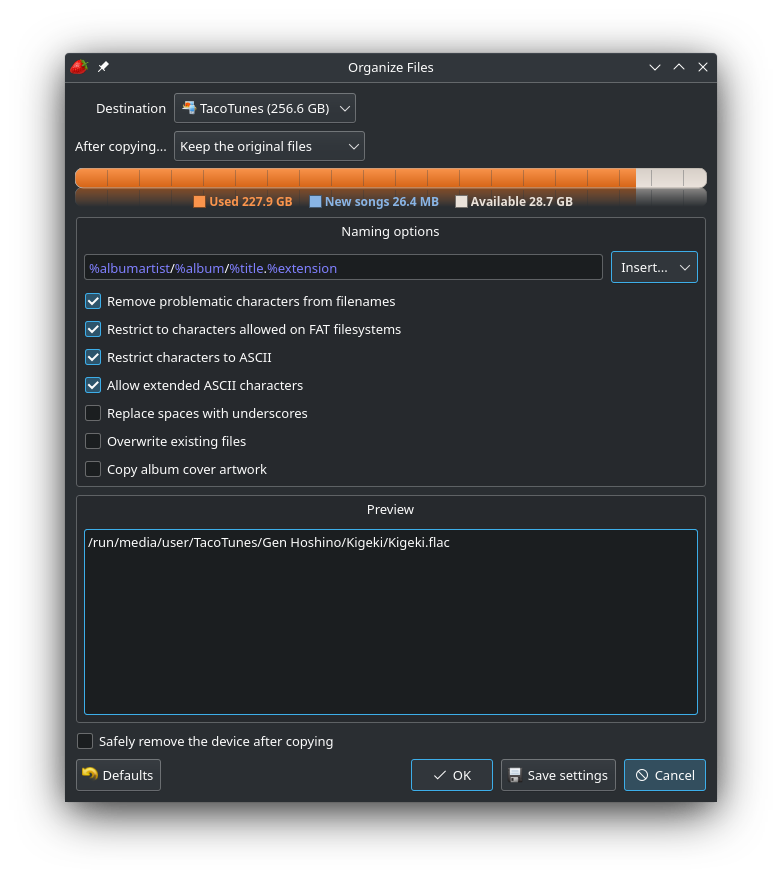
Naming options;
%albumartist/%album/%title.%extension
Remove problematic characters from filenames
Restrict to characters allowed on FAT filesystems
Restrict characters to ASCII
Allow extended ASCII characters
Example Image showing the settings.
-
Click OK
-
Process completes, no error message is shown.
-
Strawberry reports 9391 songs exist on flash drive.
Changing the copy settings has made no difference.
I went through all my music and translated all titles so that all characters are supported by FAT32 to be sure that wasn't the issue. -
Hello! It looks like you're interested in this conversation, but you don't have an account yet.
Getting fed up of having to scroll through the same posts each visit? When you register for an account, you'll always come back to exactly where you were before, and choose to be notified of new replies (either via email, or push notification). You'll also be able to save bookmarks and upvote posts to show your appreciation to other community members.
With your input, this post could be even better 💗
Register Login