Strawberry reads new "sort" tags instead of the traditional tags when sorting.
-
I use the "Album Artist" tag as one of the main ways I sort my play lists. I have noticed strawberry 1.2.14 now ignores the actual "Album Artist" tag and instead uses the "Album Artist Sort" tag.
This means I now have to go through my entire music collection and clear out all the "sort" tags. God only knows how this will screw up syncing albums to devices which strawberry has continually screwed up since it was forked from Clementine.
-
@CharAznableLoNZ said in Strawberry reads new "sort" tags instead of the traditional tags when sorting.:
I use the "Album Artist" tag as one of the main ways I sort my play lists. I have noticed strawberry 1.2.14 now ignores the actual "Album Artist" tag and instead uses the "Album Artist Sort" tag.
The playlist should still use the album artist tag, there is a separate column called "Album Artist Sort" which uses the sort tag.
Looking at the source code, I do not see how this can happen, can you show a screenshot of the playlist showing the incorrect sort behavior?This means I now have to go through my entire music collection and clear out all the "sort" tags. God only knows how this will screw up syncing albums to devices which strawberry has continually screwed up since it was forked from Clementine.
There isn't a device sync feature in Strawberry, I assume you might mean the copy to device feature?
Some parts of Strawberry have been entirely rewritten from scratch, (even though the interface looks the same) to fix underlying design flaws, sometimes this can change behavior, or cause regressions, could you explain what's screwed up? -
This post is deleted! -
@jonas
I have already gone through my library and removed all entries in the "Album Artist Sort" tag using a tagging tool to mass delete these entries.
The behaviour I saw was if there was an entry in the "Album Artist Sort" tag that did not agree with the "Album Artist" tag, the Sort tag was given priority when sorting the tracks. On my playlist I use the Album Artist tag to sort and do not have the Album Artist Sort tag displayed.As for the second issue; https://forum.strawberrymusicplayer.org/topic/1431/album-synced-to-various-artists-folder-incorrectly
What was found in that issue strawberry was taking into account tracks that were not on the playlist when copying tracks over.
-
I also have to re-tag my whole connection because wrong sorting.
I used to use Album artist + date to sort my albums from years I was iTunes user. But many albums also came pre-tagged.
The way I currently tag my albums is by putting the date in the album name sort field.
Problem: the sort fields are grayed out for certain file types, such as .m4a, even though these are sometimes tagged for sorting.
This is very annoying for bands with foreign names that start with an article, such as “Les Négresses vertes”: it is possible to sort .mp3 albums as “Négresses vertes,” but .m4a albums remain as “Les Négresse vertes” even when the sort tag does exist in the files.
The problem when editing outside of Strawberry now is that changes are sometimes not taken into account, even after restarting Strawberry and the PC.
I am running Linux Mint 22.2 Cinnamon. -
Had another instance of this happen today. This bug is very annoying. Just revert back to the old behaviour of listening to the correct tag.
-
@CharAznableLoNZ This was already included on the latest version: "Added option to turn off the use of sort tags for the collection"
-
Hello, I recently added sort tags to some songs and started to see a related issue. I think it is better to reply here first, before opening a github issue.
** Description**
In playlist view, when I sort songs by artist, I think it uses artist sort tag first, then if it is not set, it uses artist tag. It is the same for album artist and album artist sort. I think it is the same for all other normal/sort tag.
For example, on the screenshot, you can see that Pedro Capo, Pyotr Tchaikovsky and Kenji Yamamoto or sorted according to their artistsort tag (lastname) whereas the playlist view is sorted by artist tag (firstname).Additional context
Version 1.2.16 (2025.12.16):
    * Added option to turn off the use of sort tags for the collection
This option added in 1.2.16 (related to issue #1858) works in the collection view. I do not use the checkbox "use sort tags for sorting when available", as you can see on the screenshot in the collection view and in settings panel, but it may be useful!
Expected behavior
I would expect that sorting by artist only uses artist tag (the same for other sort tags), like it was before the addition of sort tags. There are sort tag columns now if I want to use sort tags.
By the way, the current option "use sort tags for sorting when available" should clearly state 'in collection view". If you think the same behavior should apply in playlist view to normal tag (artist, album...) then another checkbox could also be used for turning it on/off. However, IMHO it should not apply in playlist view since there are sort tags columns now.Screenshot
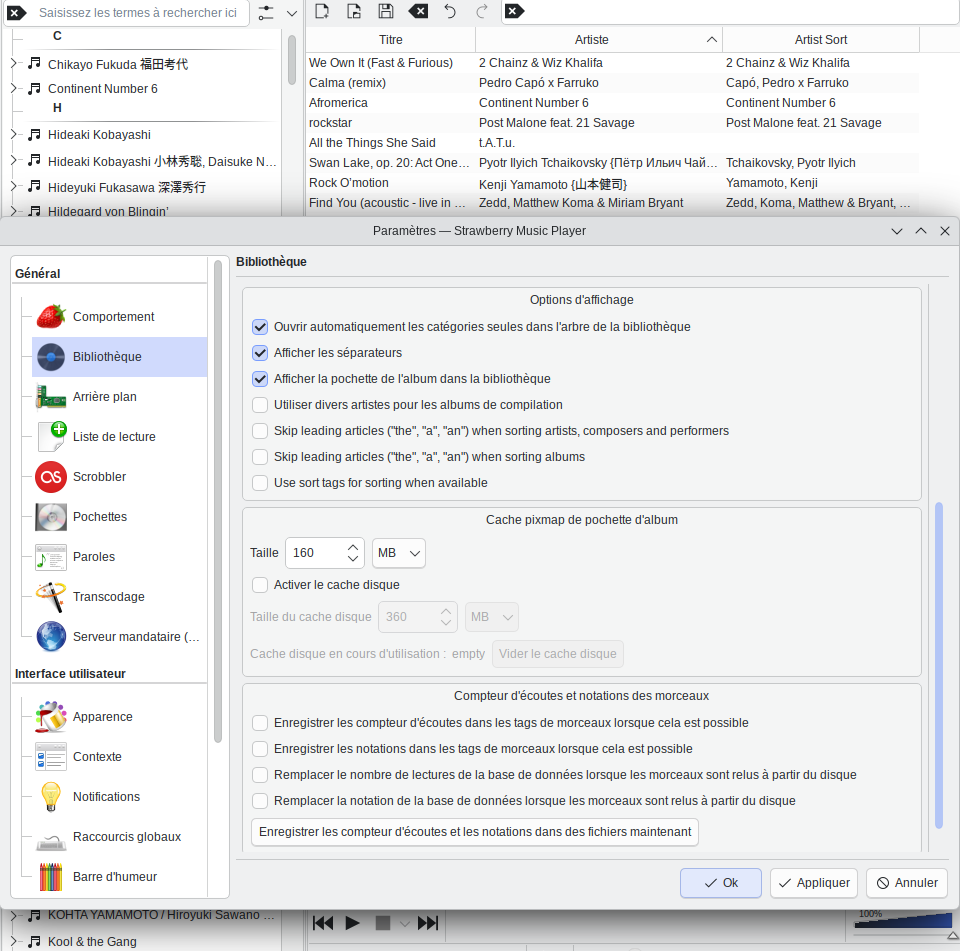
I use French locale but the only relevant options are the sort-related ones and there are not translated yet. So, it should not be a problem for anyone if one wants to check my options.System Information
- I have noticed this behavior in 1.2.16 and in 1.2.17. But, it might have started some months ago when sort tags have been added to strawberry, that is great by the way!
- Manjaro.
Is it a bug? Is it a feature? Is it a known issue and planned to change? I have not seen any issue or PR talking about it recently, only this forum topic. I took a really quick look at the playlist code but I have seen nothing. I think it is related to
playlist,compareandorder, but I do not know the initialization chain.playlist.cpp:1540 std::stable_sort(begin, new_items.end(), std::bind(&Playlist::CompareItems, column, order, std::placeholders::_1, std::placeholders::_2));