Album Synced to Various Artists Folder Incorrectly.
-
@CharAznableLoNZ I think this could be the problem:
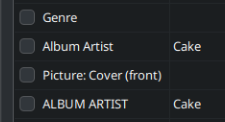
You have both "Album Artist" and "ALBUM ARTIST" tags. Please delete the second (IN CAPS) and check if that solves the issue.
-
@trincowski
I tried fixing any tracks I found double entries for and synced again. However strawberry still incorrectly places the tracks in the Various Artists folder. -
@CharAznableLoNZ That's strange... Unless you can share the files somehow, I can't understand what is happening. Do you use Soulseek, by any chance?
-
@trincowski I don't use that service. I've zipped and uploaded them to a service that will auto delete the file in three days. Tracks 10 and up are live tracks and I don't sync them. I only fixed tested tracks 1-9 of this album.
https://litter.catbox.moe/gvs6z1wepx97xhps.zip -
@CharAznableLoNZ I've just tried it.
No problem here if I just use tracks 1-9:
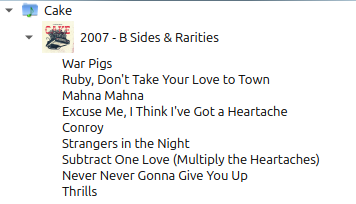
If I add tracks 10-12, then it goes into Various Artists. This happens because the "Album Artist" on the last track is CAKE instead of Cake.

Other than that, all is correct and works just fine on my system. (Strawberry Version 1.2.13 for Linux)
Since you say you're not using this last track, I don't really understand the problem... Sorry if this doesn't help. I tried...
It looks like Strawberry is taking in consideration ALL 12 files when syncing even though you only select 9 of them. If that's the case, correcting the Album Artist of Track 12 might solve the issue.
-
@trincowski I'll correct it. This seems like a bug with strawberry since it is considering things it should not be. I would really like if it only obeyed the sync options used.
-
C CharAznableLoNZ referenced this topic on
-
The issue still occurs on Version 1.2.18.
-
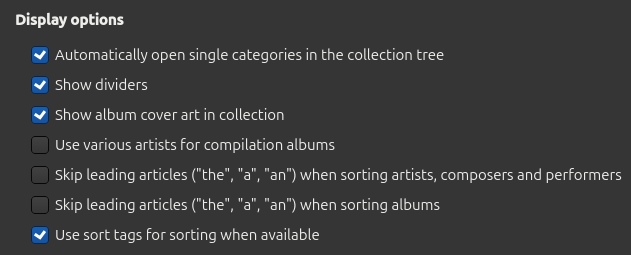
Have you tried turning off "Use various artists for compilation albums" in settings?
-
@Mei93
Yes that setting is disabled. From what I'm aware that setting only applies to how the collection is displayed in the application. This issue is how strawberry and previously clementine sort tracks that are being synced to a device. -
Tested again today with the latest. I also looked into each album that ended up getting put into the various artists folder incorrectly.
It seems that the sync to device feature takes into account ALL tracks in an album regardless if they are all being synced or not.
What I would like strawberry to do is only consider the information of the tracks being synced to the device when applying the sync options.