gst-plugin-spotify has stopped functioning after the latest update
-
Okay, after installing v1.2.29 from the Arch Linux repos (which builds directly from git), I'm now getting a different error when I try to refresh my Spotify catalogues. This error may be relevant to why the tracks no longer play.
When I try to refresh any of the catalogues or search an artist with the in-built search function, I now get these errors as a result:
17:43:28.487 ERROR SpotifyRequest:1390              Spotify: "Error transferring https://api.spotify.com/v1/me/albums?include_groups=album201Csingle - server replied with status code 403 (201)"
17:47:21.399 ERROR SpotifyRequest:1390              Spotify: "Error transferring https://api.spotify.com/v1/me/following?type=artist - server replied with status code 403 (201)"
17:47:25.955 ERROR SpotifyRequest:1390              Spotify: "Error transferring https://api.spotify.com/v1/me/tracks - server replied with status code 403 (201)"
17:47:33.672 ERROR SpotifyRequest:1390              Spotify: "Error transferring https://api.spotify.com/v1/search?limit=50&q=project&type=track - server replied with status code 403 (201)"
17:47:38.142 ERROR SpotifyRequest:1390              Spotify: "Error transferring https://api.spotify.com/v1/search?limit=10&q=project aegis&type=artist - server replied with status code 403 (201)"
Clicking on the webpages sends me directly to a page that says this:
{
  "error": {
    "status": 401,
    "message": "Missing/invalid/expired access token"
  }
}
Here are the headers:
Response headersServer-Timing: uasw-json-data;dur=0;desc="%7B%22userAgent%22%3A%22Mozilla%2F5.0%20(Windows%20NT%2010.0%3B%20Win64%3B%20x64%3B%20rv%3A152.0)%20Gecko%2F20100101%20Firefox%2F152.0%22%2C%22appVersion%22%3A%225.0%20(Windows)%22%2C%22platform%22%3A%22Win32%22%2C%22vendor%22%3A%22%22%2C%22product%22%3A%22Gecko%22%2C%22userAgentData%22%3A%22%5Bdelete%5D%22%2C%22oscpu%22%3A%22Windows%2010%22%2C%22productSub%22%3A%2220100101%22%2C%22buildID%22%3A%2220181001000000%22%2C%22type%22%3A%22user%22%7D" X-Firefox-Http3: h3 access-control-allow-credentials: true access-control-allow-headers: Accept, App-Platform, Authorization, Content-Type, Origin, Retry-After, Spotify-App-Version, X-Cloud-Trace-Context, client-token, content-access-token access-control-allow-methods: GET, POST, OPTIONS, PUT, DELETE, PATCH access-control-allow-origin: * access-control-max-age: 604800 alt-svc: h3=":443"; ma=2592000,h3-29=":443"; ma=2592000, h3=":443"; ma=2592000 content-length: 94 content-type: application/json date: Wed, 09 Sep 2026 07:43:40 GMT server: envoy strict-transport-security: max-age=31536000 vary: Accept-Encoding via: HTTP/2 edgeproxy, 1.1 google www-authenticate: Bearer realm="spotify", error="missing_token", error_description="No token provided" x-content-type-options: nosniffRequest headers
Accept: text/html,application/xhtml+xml,application/xml;q=0.9,*/*;q=0.8
Accept-Encoding: gzip, deflate, br, zstd
Accept-Language: en-US,en;q=0.9
Alt-Used: api.spotify.com
Connection: keep-alive
Host: api.spotify.com
Priority: u=0, i
Sec-Fetch-Dest: document
Sec-Fetch-Mode: navigate
Sec-Fetch-Site: none
Sec-Fetch-User: ?1
Sec-GPC: 1
TE: trailers
Upgrade-Insecure-Requests: 1
User-Agent: Mozilla/5.0 (Windows NT 10.0; Win64; x64; rv:152.0) Gecko/20100101 Firefox/152.0
(note: the user agent says Windows because I have a user agent switcher extension enabled)
If you need more info, please let me know

-
@jasmint
If you build from git source you need to provide API credentials manually in the settings, you can do this here here: https://developer.spotify.com/dashboard (Redirect URI need to be set to https://oauth.strawberrymusicplayer.org/), Apply settings, then login again -
@jonas Good news but not 100% yet: after I used custom credentials following your steps (had to restart Strawberry after I signed out from my other non-custom one to get it to work, really weird), I can now use the in-built search function and refresh my catalogues!

...unfortunately, that's where the good part ends. After searching for a song, adding it to my playlist, and trying to play it, I still get this error:
17:58:16.446 ERROR GstEnginePipeline:1867           ErrorMessageReceived ID: 2 Domain: 2267 Code: 3 Error: "Resource not found."
17:58:16.446 ERROR GstEnginePipeline:1868           ErrorMessageReceived ID: 2 Domain: 2267 Code: 3 Debug: "audio/spotify/src/spotifyaudiosrc/imp.rs(279): <gstspotify::spotifyaudiosrc::imp::SpotifyAudioSrc as gstreamer_base::subclass::push_src::PushSrcImpl>::create (): /GstPlayBin3:pipeline-2-pipeline/GstURIDecodeBin3:uridecodebin3/GstURISourceBin:urisourcebin1/GstSpotifyAudioSrc:spotifyaudiosrc1:\ntrack is not available"
17:58:16.446 ERROR GstEngine:640                    GStreamer error: 2267 3 "Resource not found."
So we're back to square one.
At this point, I am very lost ️
️
if there's anything you want to try or experiment with, happy to try! -
@jasmint the 1.2.29 release notes indicate that to build from source you should use the .tar.xz file located in the release assets, which includes an apicredentials.h file (not present in the git source tarball). Does using the .tar.xz get you all the way there?
(which builds directly from git)
Maybe it builds from the git .tar.xz asset not truly directly from git which, if so, you can ignore me.
-
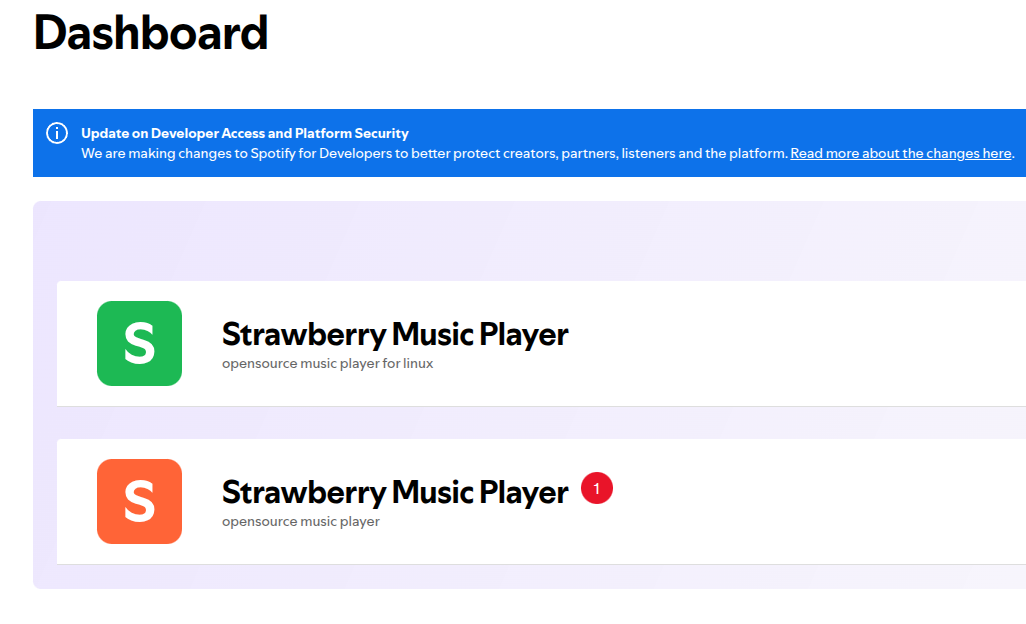
I realize that the new API credentials I created is in development mode, apparently it has some limitations like rate limiting and maximum number users, so I'll need to switch back to using the old.
-
Maybe it builds from the git .tar.xz asset not truly directly from git which, if so, you can ignore me.
I had a poke around in the PKGBUILD of the official Arch package, and the source is
source=(git+https://github.com/strawberrymusicplayer/strawberry#tag=$pkgver
        https://github.com/strawberrymusicplayer/strawberry/releases/download/$pkgver/$pkgname-$pkgver.tar.xz)
So it does build from the .tar.xz asset (which may be a recent change after the credential thing). The more you know

@jonas
Oh i did notice I got rate limited before when trying to search up artists, so that's a nice change! I switched back to non-custom API credentials and can confirm there is no more rate limiting reported in the CLIMy Spotify tracks still don't play though (getting that same error of resource not found).
Running Strawberry withGST_DEBUG=3 strawberry --verbose0:00:07.380990318 415737 415942 ERROR spotifyaudiosrc audio/spotify/src/spotifyaudiosrc/imp.rs:278:<gstspotify::spotifyaudiosrc::imp::SpotifyAudioSrc as gstreamer_base::subclass::push_src::PushSrcImpl>::create:<spotifyaudiosrc0> track is not available 0:00:07.381084980 415737 415942 WARN basesrc gstbasesrc.c:3187:gst_base_src_loop:<spotifyaudiosrc0> error: Internal data stream error. 0:00:07.381095660 415737 415942 WARN basesrc gstbasesrc.c:3187:gst_base_src_loop:<spotifyaudiosrc0> error: streaming stopped, reason error (-5) 0:00:07.381131569 415737 415942 WARN oggdemux gstoggdemux.c:4799:gst_ogg_demux_send_event:<oggdemux0> error: EOS before finding a chain 20:38:30.548 ERROR GstEnginePipeline:1867 ErrorMessageReceived ID: 1 Domain: 2267 Code: 3 Error: "Resource not found." 0:00:07.381152259 415737 415942 WARN oggdemux gstoggdemux.c:2574:gst_ogg_demux_sink_event:<oggdemux0> EOS while trying to retrieve chain, seeking disabled 20:38:30.548 ERROR GstEnginePipeline:1868 ErrorMessageReceived ID: 1 Domain: 2267 Code: 3 Debug: "audio/spotify/src/spotifyaudiosrc/imp.rs(279): <gstspotify::spotifyaudiosrc::imp::SpotifyAudioSrc as gstreamer_base::subclass::push_src::PushSrcImpl>::create (): /GstPlayBin3:pipeline-1-pipeline/GstURIDecodeBin3:uridecodebin3/GstURISourceBin:urisourcebin0/GstSpotifyAudioSrc:spotifyaudiosrc0:\ntrack is not available" 20:38:30.548 ERROR GstEngine:640 GStreamer error: 2267 3 "Resource not found." 20:38:30.575 WARN IconLoader:129 Couldn't load icon "media-playback-start" from system theme icons. 20:38:30.575 WARN IconLoader:129 Couldn't load icon "media-playback-start" from system theme icons. 20:38:30.576 WARN IconLoader:129 Couldn't load icon "media-playback-start" from system theme icons. 20:38:30.576 WARN IconLoader:129 Couldn't load icon "media-playback-start" from system theme icons. 0:00:07.410709571 415737 415737 ERROR GST_BUS gstbus.c:1081:gst_bus_remove_watch:<bus1> no bus watch was presentI guess some part of my install is just borked... I did try deleting the Strawberry folder in .cache, but no change.
-
So it does build from the .tar.xz asset (which may be a recent change after the credential thing). The more you know :thinking_face:Not exactly. Its using the git tag.
-
Not exactly. Its using the git tag.
Oh, nvm then lol
(edit: I thought the playback suddenly started working again, but I was actually playing from my local files LMAO. nvm!)
-
@kxfu
What version of gst-plugins-rs do you have?
The GStreamer Spotify plugin needs librespot 0.8 to play tracks, which is in version 0.14.4 and newer. -
The issue could also occur of you don't have a premium subscription.
