Cannot close Sponsering Window
-
Hallo,
newbie installed Strawberry the first time. After restart, the Sponsering window and Strawberry isn´t clickable. I must kill the process over the task manager. I cannot use the program. Any idea?
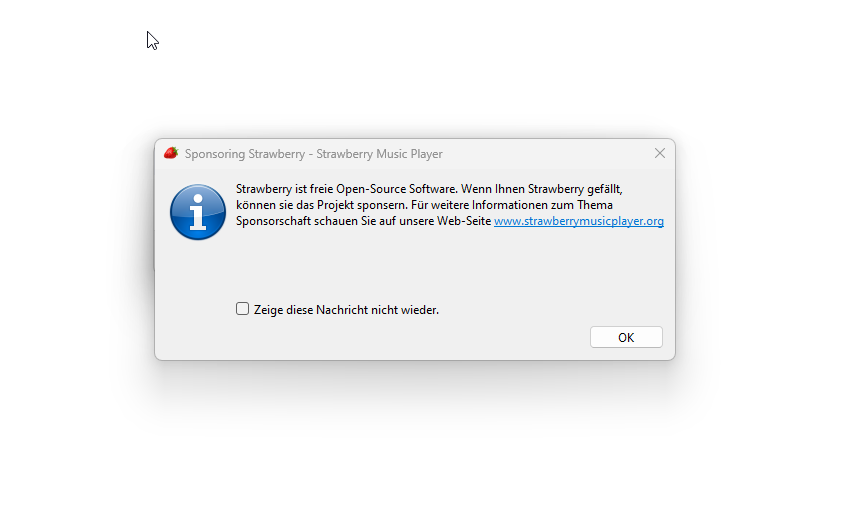
-
Not sure why that happens. But you can disable it manually through the registry under
Computer\HKEY_CURRENT_USER\SOFTWARE\Strawberry\Strawberry\MainWindow, add String Valuedo_not_show_sponsor_messagewith valuetrue.Or you can download and run: https://files.strawberrymusicplayer.org/do_not_show_sponsor_message.reg which does the same.
-
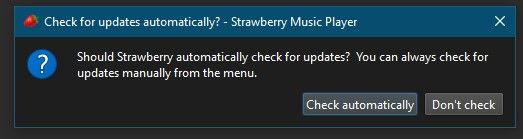
For info, I had this same problem and it was due to another window being behind the sponsoring window which needed to be closed first. This occured after a restart and the language had changed (even though I hadn't selected to change the language).
-
@Muncy
Do you know what other window this was? -
@jonas Unfortunatley not. There was a slither visible at the top of the sponsering window and I clicked top right where I assumed the red X to close would be.
-
B buffalo referenced this topic on
-
The Window underneath is: The automatic update one

Hello! It looks like you're interested in this conversation, but you don't have an account yet.
Getting fed up of having to scroll through the same posts each visit? When you register for an account, you'll always come back to exactly where you were before, and choose to be notified of new replies (either via email, or push notification). You'll also be able to save bookmarks and upvote posts to show your appreciation to other community members.
With your input, this post could be even better 💗
Register Login