Look for Menu -> Tools -> Settings... -> Playlist -> Use alternating row colors
B
Posts made by buffalo
-
RE: How to fix Colour themeposted in Technical Help
-
RE: How to always display filename in collectionposted in Technical Help
@amour8440083555 How does you post thematically fit in the current thread?
-
RE: Looks strangeposted in General Discussion
Look for Menu -> Tools -> Settings... -> Playlist -> Use alternating row colors
-
RE: cover size in contextposted in General Discussion
I have seen you upvoted my rather old feature request. Does your question aim to something like this?
What do you mean by that you can resize it manually? -
RE: how to autostart Strawberry in ubuntu linuxposted in Technical Help
@animatedjay: Which is the playback state when you restart Strawberry or the whole machine, Playing, Paused, Stopped?
I'm running a Mini PC with Manjaro Linux as my "stereo" with a playlist containing the whole music collection in random order, Strawberry in autostart, and have "Resume playback on start" activated as well.
In Paused mode, restarting the program or rebooting the computer makes Strawberry starting playback immediately, in Stopped mode it also starts in Stopped mode again, so for me that option works as expected. -
RE: Color settings missing in version 1.0.14posted in Technical Help
@Cooker_8872
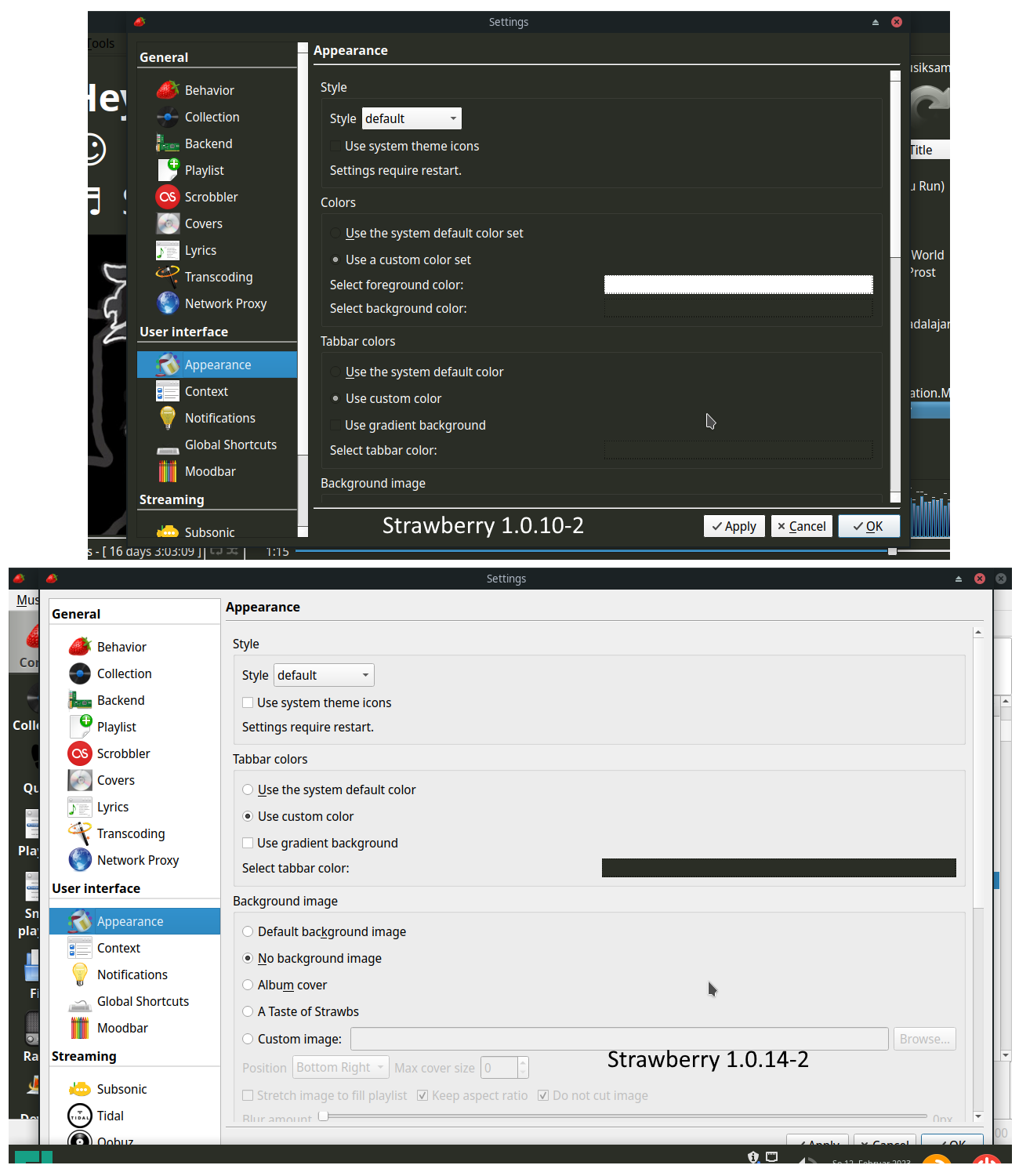
The settings were removed in 1.0.12. So you would have to downgrade to 1.0.11.But maybe the workaround using qt6ct works for you too.
-
RE: Color settings missing in version 1.0.14posted in Technical Help
@PeterB
Many thanks for the hint about qt6ct! I managed to adjust a copy of Fusion "darker" color scheme to resemble my old color settings.@jonas
I think a less elaborate way for yourself and users like me would have been to keep the settings and display a warning about the potential compatibility problems with some styles. -
Color settings missing in version 1.0.14posted in Technical Help
I am running Strawberry on 2 machines under Manjaro 22.0. Recently I updated on one system from version 1.0.10 to 1.0.14 just to find that the general background and foreground color settings in Appearance configuration have vanished and my settings have been reset. What is wrong here?
-
RE: A genuine question.posted in General Discussion
@ash_w: If you mean the reputation system in this forum see https://www.youtube.com/watch?v=MFoacn670EU for explanation.
-
RE: Option to toggle grey versions of assetsposted in Feature Suggestions
Concerning the strawberry image in the context panel I did a similar feature request here already.
-
RE: GStreamer installation is missing a plug-inposted in Technical Help
@catch22: Maybe an update to latest version 1.0.3 will help.
-
RE: Seekbar position different in similar environments - find no way to configure thisposted in Technical Help
@Zapp
I dont know what this playing widget feature is, as I see no difference (even while playing) no matter if its activated or not, but even with it deactivated adding the PlayingWidget section and setting the above_status_bar key in strawberry.conf stretches the seekbar to the whole width as desired, so many thanks for your hint. -
Seekbar position different in similar environments - find no way to configure thisposted in Technical Help
Hello,
I have Strawberry 1.0.1 installed under Manjaro Linux 21.2.3 both on a physical computer and a VMWare Player virtual machine on a Windows 10 host.
On the physical computer the seekbar/progressbar is positioned at the bottom of the playlist section below the play buttons and the analyzer.

On the virtual machine it is stretched to the whole width of the window below context and playlist section.

I prefer the second layout but I can't find a possibility to change that in the settings window. Is there a setting for that or is it dependent on something else?
-
RE: Error message during installation on Win7x64posted in Technical Help
The latest version of Strawberry does not support Windows 7 anymore, see thread
https://forum.strawberrymusicplayer.org/topic/484/error-on-windows-7-getsystemtimepreciseasfiletime -
RE: Changing the default behavior for the double-click on smart playlistsposted in Technical Help
@orinovet: Just go to this forums mainpage and you see a category "Feature Suggestions".