• 0 Votes
    2 Posts
    479 Views
    P
    Try running Strawberry from the command line. Its verbose output might provide some clues as to whats going on.
  • This topic is deleted!

    1
    0 Votes
    1 Posts
    3 Views
    No one has replied
  • How to update on Linux Mint 21?

    3
    0 Votes
    3 Posts
    2k Views
    scubaboycS
    @juanito Thanks. I think i did that correctly.
  • Prevent automatic collection update

    3
    0 Votes
    3 Posts
    1k Views
    J
    And more annoyingly (to me), when one of these collection updates is going on, all my songs appear as never having been played, even though I can see that the in the .db file they appear with the correct data. This means that if I play one of the songs in the collection (e.g. by loading a file from command line), its "last played" and "times played" data will most likely not be updated. So far, once the update is completed, everything seems to work fine, but I am fearing the day when such an update will wipe all the stats for no good reason...
  • Multiple Genres

    4
    0 Votes
    4 Posts
    2k Views
    CherryStrawC
    @celdin_terrified I suggest you to duplicate the files. It's a messy solution, yes, but the data remains completely intact; Speaking from experience of course, I have various albums and songs with multiple genres and I rather duplicate 'em than changing the metadata, for example.
  • Strawberry won't start (Ubuntu 20.04)

    4
    0 Votes
    4 Posts
    1k Views
    B
    @jonas Yep, I uninstalled the python package strawberry-graphql, and reinstalled strawberry music player and it's back to normal. Thanks!
  • 1 Votes
    17 Posts
    9k Views
    A
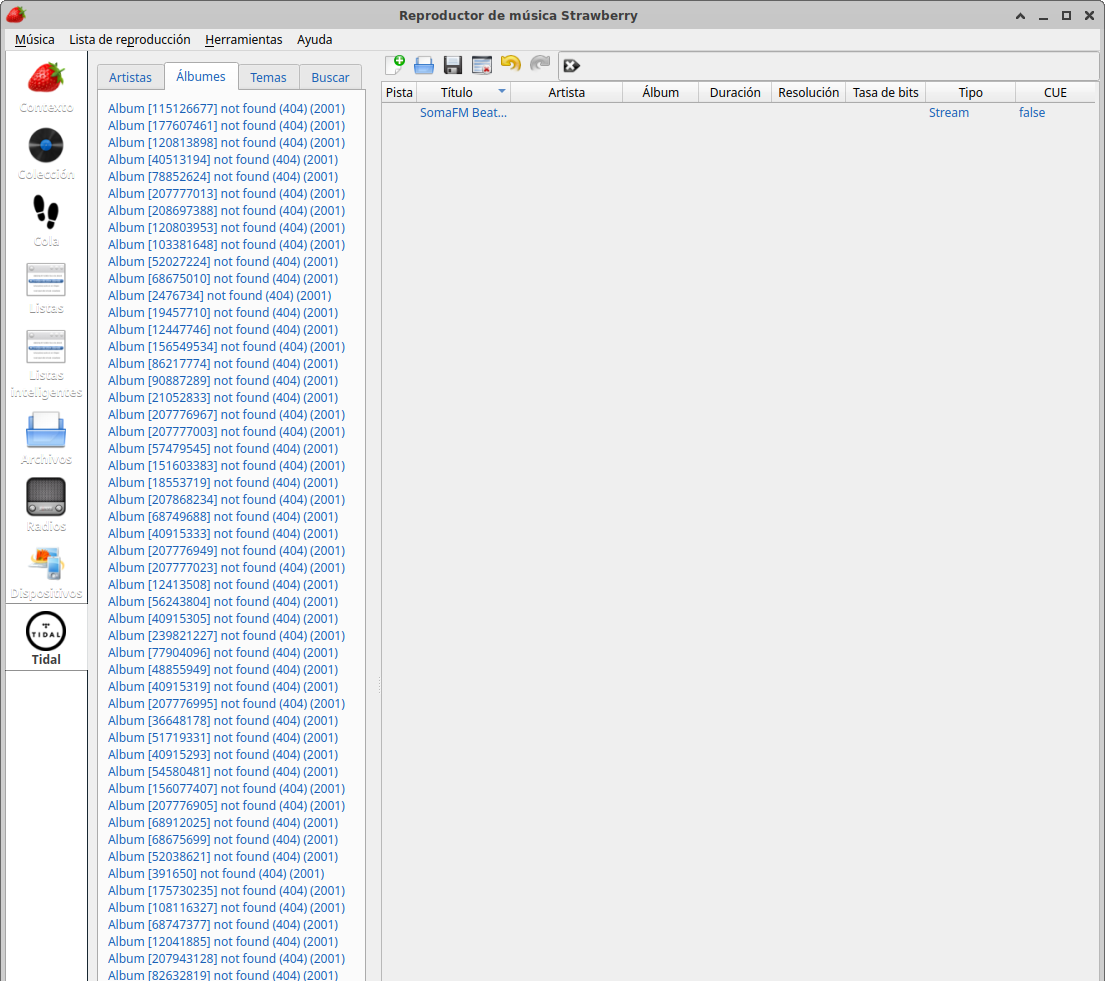
    @nonsequitur said in Tidal music catalog is not displayed. "Album .........not found (404) (2001)": Finally, I have managed to update the collection thanks to the advice of "nonsequitur" to delete the albums that Tidal has been disabling from my mobile app and thus I could finally make all the music appear again in Strawberry. Many thanks to the advisors and collaborators who have helped me find the solution!
  • Keeping albums with same names apart

    6
    0 Votes
    6 Posts
    2k Views
    D
    @jonas I've always had cover JPGs in the folders (never auto-downloaded), and this is the only app this has happened on! The folder you've directed me to also doesn't have cached covers (I'd already turned off that tickbox), just "strawberry.db". I can confirm that Cover Manager shows them separately with the correct covers in the big grid, so it really does seem to be the sidebar with albums as the list that has this issue -- see attached image (RSF are the top set of tracks): [image: Right Said Fred cover on REM.png]
  • Backend settings not persistent

    3
    0 Votes
    3 Posts
    2k Views
    jonasJ
    It's common for alsa devices to change index, you can either select the pcm option, or you need to configure them in modprobe to use a fixed number (https://wiki.archlinux.org/title/Advanced_Linux_Sound_Architecture). However if you have PulseAudio running, you should not use ALSA at all.
  • Font size does not follow KDE

    2
    1
    0 Votes
    2 Posts
    769 Views
    jonasJ
    @jellby There is an utility called qt6ct (https://github.com/trialuser02/qt6ct) which let's you configure the fonts.
  • This topic is deleted!

    1
    1
    0 Votes
    1 Posts
    6 Views
    No one has replied
  • How to connect to qobuz

    2
    1 Votes
    2 Posts
    1k Views
    S
    I found id's that fit and qobuz is connecting. Artist names and playlists are downloading, but when trying to play, an error occurs: Invalid Request Signature parameter (request_sig) (Root=1-635162b8-68dfed7a7e207e817278b692) (400) So I can't connect to qobuz on ubuntu(
  • Lyrics from Genius show up incomplete in the context window

    9
    0 Votes
    9 Posts
    2k Views
    E
    @jonas Tested the last build, indeed all the paragraphs are showing now! Thank you for your continued work!
  • This topic is deleted!

    1
    0 Votes
    1 Posts
    5 Views
    No one has replied
  • Please Just Read this.

    3
    -1 Votes
    3 Posts
    1k Views
    S
    Strawberry is not a streaming service (although it does have some functionality for that if you are subscribed to, for example, Subsonic or Tidal). You will have to install the app on your computer and you must also have music files on your computer to play. If you have an internet connection, Strawberry offers some internet radio stations.
  • This topic is deleted!

    1
    0 Votes
    1 Posts
    2 Views
    No one has replied
  • Options for scripting or command-line control

    2
    0 Votes
    2 Posts
    2k Views
    J
    For it's worth, this is what I came up with. Note that it's customized for my own use and library, you may need to change some things if you want to use it. Some notes: This is designed to be run when Strawberry is stopped, with an empty (or finished, or not yet started) playlist. exclude means the matching directories will be ignored. In this case everything with /Demos/ or /Classical/. Since this is for full album random play, it will stop if there is some half-played album (any album with songs with different playcounts). I have the disc tag only for series like "Complete Works", where I typically don't want to play all discs sequentially. For the more common double disc albums, I just tag all tracks sequentially. If you have disc tags, you may want to tweak the album selection scheme (album_is). What I'd appreciate from the Strawberry side: A way to add tracks directly from the database, without having to use the URL (e.g. some kind of track ids). Some notification when a playlist ends, or a way to run a script when a playlist ends (and possibly some events). Support for MPRIS TrackList interface. And of course the ability of doing all of this from within the player, without using an external script. #!/usr/bin/env python3 import sqlite3 import dbus import urllib.parse import re import sys import os.path import subprocess import numpy as np from datetime import datetime, timedelta # Set up database location and options dbfile = '/home/ignacio/.local/share/strawberry/strawberry/strawberry.db' album_is = ['album', 'effective_albumartist', 'disc'] # These identify an album exclude_dirs = ['Demos', 'Classical'] recent = timedelta(days=120) # Format for album in notifications def album_print(row): disc = f' disc {row["disc"]}' if row['disc'] > 0 else '' return f'<i>{row["album"]}</i> ({row["effective_albumartist"]}){disc}' # Set up notification system item = 'org.freedesktop.Notifications' ntf = dbus.Interface(dbus.SessionBus().get_object(item, '/'+item.replace('.', '/')), item) def notify(title='Title', body='Body.'): ntf.Notify('randomalbum', 0, '', title, body, [], {'urgency': 1}, 5000) # Check Strawberry status try: plyr = dbus.Interface(dbus.SessionBus().get_object('org.mpris.MediaPlayer2.strawberry', '/org/mpris/MediaPlayer2'), 'org.freedesktop.DBus.Properties') status = plyr.Get('org.mpris.MediaPlayer2.Player', 'PlaybackStatus') except dbus.exceptions.DBusException: notify('Not running!', 'Strawberry is not running. Exit.') sys.exit(1) if status != 'Stopped': notify('Not stopped!', 'Strawberry is not stopped. Exit.') sys.exit(1) # Open database con = sqlite3.connect(f'file:{dbfile}?mode=ro', uri=True) con.row_factory = sqlite3.Row cur = con.cursor() # Check partially played albums (with multiple playcounts) album_is_list = ', '.join(album_is) res = cur.execute(f'SELECT COUNT ( DISTINCT playcount ) AS "nr_of_playcounts", {album_is_list} FROM songs GROUP BY {album_is_list}') first_songs = res.fetchall() msg = '' for i in first_songs: msg = [] if i['nr_of_playcounts'] > 1: msg += '* '+album_print(i) if msg: notify('Multiple playcounts', '\n'.join(msg)) sys.exit(1) # Get data for the first song of each album res = cur.execute(f'SELECT MIN(track), url, playcount, lastplayed, {album_is_list} FROM songs GROUP BY {album_is_list}') first_songs = res.fetchall() now = datetime.now() exclude_re = '/(' + '|'.join([urllib.parse.quote(i, safe="/(),'!&;+=") for i in exclude_dirs]) + ')/' mask = [True for i in first_songs] # Manually exclude directories for i,j in enumerate(first_songs): if re.search(exclude_re,j['url']): mask[i] = False max_playcount = max([j['playcount'] for i,j in enumerate(first_songs) if mask[i]]) # Exclude recently-played songs for i,j in enumerate(first_songs): dt = datetime.fromtimestamp(j['lastplayed']) if now-dt < recent: mask[i] = False # Tentatively exclude max-played songs, # unless the result is empty mp_mask = [True for i in first_songs] for i,j in enumerate(first_songs): if j['playcount'] >= max_playcount: mp_mask[i] = False new_mask = [i and j for i,j in zip(mask,mp_mask)] if any(new_mask): mask = new_mask else: notify('Library exhausted', f'Increasing max. playcount to {max_playcount+1}.') # Pick a random song out of the remaining ones weights = np.array([1 if i else 0 for i in mask]) left = np.count_nonzero(weights) pick = np.random.choice(len(mask), p=weights/np.sum(weights)) pick = first_songs[pick] filename = urllib.parse.unquote(urllib.parse.urlsplit(pick['url']).path) if (os.path.isfile(filename)): # Select the full album (disc) from the picked song notify('Next album', album_print(pick) + f'\n[out of {left}]') album = tuple([pick[i] for i in album_is]) album_exp = ' AND '.join([f'{i} IS ?' for i in album_is]) res = cur.execute(f'SELECT url FROM songs WHERE {album_exp} ORDER BY track', album) # Add the album, replacing the current playlist subprocess.call(['strawberry', '-l'] + [i['url'] for i in res.fetchall()]) else: notify('Missing file', f'File not found. Is the library mounted?\n{filename}') sys.exit(1) con.close()
  • 0 Votes
    3 Posts
    640 Views
    jonasJ
    There is no strawberry.conf on windows, all the settings are in the registry. All you need to do is to delete HKEY_CURRENT_USER\Software\Strawberry\Strawberry\SerializedSmartPlaylists from the registry, and they will be re-created.
  • Covers not showing on the multimedia player of kde

    3
    0 Votes
    3 Posts
    813 Views
    G
    @wengels464 Some of the files have jpg alongside them, and the majority have it embedded. The files are mp3, Flac and ogg. And I have indeed verified it
  • Keyboard Shortcuts on Intel Mac.

    1
    0 Votes
    1 Posts
    339 Views
    No one has replied